


The rapid global expansion of Fiber-to-the-Home (FTTH) networks has fundamentally changed how consumers and businesses connect. As gigabit-speed access becomes the standard, the choice of Customer Premises Equipment (CPE) is crucial. Users are often faced with a decision: a sleek, integrated Wi-Fi Optical Network Unit (ONU) or the flexible, multi-device setup of an Optical Network Terminal (ONT) paired with a Traditional Wi-Fi Router.
This guide provides an expert comparison of these two essential networking devices, detailing their technical differences, operational advantages, and providing clear guidance for specific deployment scenarios to ensure you select the best long-term solution.
>> Contents
Wi-Fi ONU and Wi-Fi Router Overview
Understanding the function of each device within the larger Optical Distribution Network (ODN) is key to recognizing their differences.
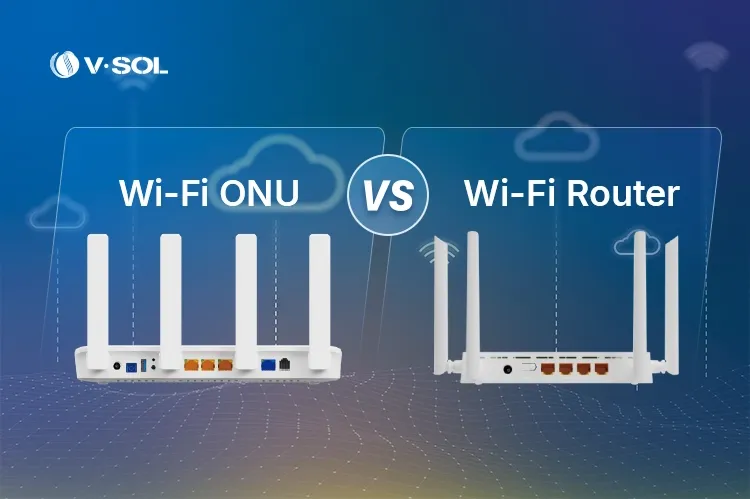
What is a Wi-Fi ONU (Integrated Solution)
A Wi-Fi ONU (or Wi-Fi ONT) is a single, unified device that performs two primary functions:
- Optical Termination (The Modem Role): It directly connects to the incoming optical fiber, terminating the GPON, EPON, or 10G PON signal sent from the Optical Line Terminal (OLT) at the Internet Service Provider’s (ISP) central office. This is a Layer 2 function.
- Gateway/Routing (The Router Role): It features a powerful chipset that manages Network Address Translation (NAT), runs the DHCP server, handles Quality of Service (QoS), and provides the wireless access point (AP) functionality to deliver Wi-Fi coverage across the premises.
In essence, a Wi-Fi ONU replaces two boxes with one, simplifying the home or enterprise network edge.

What is a Traditional Wi-Fi Router (Standalone Device)
A Traditional Wi-Fi Router is a pure Layer 3 networking device. It is designed solely to handle routing, managing the private local area network (LAN), and providing Wi-Fi coverage.
Crucially, a traditional router does not have a PON optical interface.
- This setup is versatile, as the router can also be connected to other broadband access technologies like DSL modems, Cable modems, or a standard Ethernet wall jack (FTTB).
- To access an FTTH service, it must be connected via an Ethernet cable to a separate, dedicated ONT/Optical Modem.

Key Differences Between Wi-Fi ONU and Wi-Fi Router
The core divergence between the two devices is defined by their role in the fiber access process and how they interact with the ISP’s network management system.
1. Network Architecture (One Box vs. Two Boxes)
| Feature | Wi-Fi ONU | Traditional Wi-Fi Router + ONT |
| Fiber Termination | Yes (Built-in PON Port) | No (Requires a separate ONT/Modem) |
| Device Count | One (Integrated Optical Modem + Router) | Two (ONT/Modem + Router) |
| Network Hops | Single hop for optical conversion and routing | Two hops (ONT – Router) |
| Cabling | Simpler; power and fiber only | More complex; fiber, power (x2), and Ethernet cable connecting the two units |
2. Latency and Speed Performance
While modern Ethernet cables are extremely fast, every device introduced into the data path adds a micro-delay (latency).
- Wi-Fi ONU: By consolidating the optical conversion and routing into a single hardware/software stack, the ONU reduces processing delays. This results in lower effective latency, which is critical for real-time applications like competitive gaming, high-frequency trading, and AI workload synchronization.
- Traditional Router: The necessary connection between the ONT and the router adds an additional processing stage and an extra physical hop, which can marginally increase overall network latency.
3. Management and Trustworthiness (ISP Control)
This is a critical difference for reliability and trustworthiness (T in EEAT).
- Wi-Fi ONU (ISP Control): ONUs are managed remotely by the ISP’s OLT using the OMCI (ONT Management and Control Interface) protocol. This allows the ISP to perform remote diagnostics, firmware upgrades, configuration changes (like QoS), and troubleshooting without sending a technician, significantly improving service quality and stability.
- Traditional Router (User Control): The router is a customer-owned device. The ISP has no control over its settings or firmware, relying on the user for updates. This can lead to service issues if the router is misconfigured or running outdated firmware.
4. Setup Flexibility and Upgrade Cycle
- Traditional Router: Offers maximum flexibility. Users can swap out the router whenever a newer Wi-Fi standard (e.g., from Wi-Fi 6 to Wi-Fi 7) is released, keeping the ISP-provided ONT. This is the easiest and cheapest consumer upgrade path.
- Wi-Fi ONU: Provides a simplified setup but requires the ISP to manage the device lifecycle. Upgrading to a new standard means replacing the entire integrated unit, which is typically handled by the service provider.
5. Potential for “Double NAT” Issues
When a Traditional Router is connected to an ONT that is also acting as a router, a common issue called Double Network Address Translation (Double NAT) can occur.
- This complication can break functionality for port forwarding, VPNs, and online gaming.
- The solution is often to configure the ONT in “Bridge Mode,” which adds complexity.
- A Wi-Fi ONU completely avoids this issue by design, as it functions as the single gateway device.
Deployment Guidance: Which CPE Should You Choose?
The decision hinges on your environment, performance goals, and preference for simplicity versus flexibility.
✅ Choose the Wi-Fi ONU if:
| Scenario | Rationale |
| New FTTH Installation (Home or Enterprise) | Simplifies wiring (less clutter), reduces power consumption, and eliminates complexity with one power supply. |
| Mission-Critical / Low-Latency Applications | The reduced network hops and integrated hardware ensure the lowest possible latency and most stable PON-level performance. |
| ISP Deployments (High EEAT for ISPs) | OMCI remote management drastically lowers maintenance costs, improves Quality of Service (QoS) control, and simplifies remote troubleshooting. VSOL Wi-Fi ONUs are optimized for this centralized management model. |
| Need for Simplified, Stable Network | Avoids Double NAT and configuration conflicts, leading to higher reliability and fewer user-initiated support calls. |
✅ Choose the Traditional Wi-Fi Router (paired with an ONT) if:
| Scenario | Rationale |
| Frequent Router Upgrades | You want to easily swap out your router for the latest Wi-Fi standard (e.g., Wi-Fi 7) without involving the ISP or changing the fiber termination unit. |
| Specialized Router Needs | You require a high-end gaming router, a specific Mesh Wi-Fi system, or advanced security/VPN features not available on the ISP-provided unit. |
| Non-Fiber Broadband Access | You are using DSL, Cable, or an existing Ethernet connection. The router is universally compatible with different modems. |
| Existing Infrastructure | You already own a high-performance router and only need the ISP to provide the basic ONT function. |
Also Read: Why Dual-Band Wi-Fi ONUs Are Essential in FTTH Networks
Conclusion and Professional Recommendation
The Wi-Fi ONU is the modern, technically superior choice for environments where fiber access is permanent, stability is paramount, and a simplified setup is desired. It offers the best blend of performance, manageability, and cable organization for the modern FTTH subscriber. Conversely, the Traditional Wi-Fi Router excels in flexibility and customization, making it ideal for the power user who prioritizes independent component upgrades.
VSOL Solutions: Whether you prioritize the unified efficiency of the VSOL Wi-Fi ONU series (covering GPON/EPON/10G PON with Wi-Fi 6 options) or the flexible stability of the VSOL Wi-Fi Router series, choosing a professional-grade solution is key to maximizing your gigabit connection’s potential.
The future is integrated: As technologies advance toward Wi-Fi 7, integrated ONU solutions will continue to be the standard for high-speed, stable, and remotely manageable fiber access networks.


