


If you’ve just installed your VSOL ONU or need to change its configuration, you can manage the device through its built-in web interface. This guide answers the most common questions about logging in to a VSOL ONU and resolving login issues.
Note: The default login information below applies to VSOL ONUs with factory settings. If your ISP or network administrator has customized the device, the IP address or login credentials may be different.
1. What is the Default IP Address of a VSOL ONU/ONT
The factory default management IP address of most VSOL ONUs is: 192.168.1.1
Enter thsi address into your web brower’saddress bar to access the login page.
If the page cannot be reached, check that:
- Your computer is connected to the ONU via Ethernet ot Wi-Fi.
- Your device has obtained an IP address in the same subnet.
- The ONU has finished booting.
- The management IP has noe been changed previously.
2. What are the Default Username and Password?
By default, the administrator login credentials are:
| Item | Default Value |
| IP Address | 192.168.1.1 |
| Username | admin |
| Password | stdONU101 |
For security reasons, it is recommended to change the default administrator password after your first successful login.
3. How Do I Log in to VSOL ONU/ONT
Follow these simple steps:
Step 1. Connect to the ONU
Complete the hardware installation and connect your computer to the ONU using either:
- An Ethernet cable (recommended), or
- The default WI-Fi network (if enabled).
Step 2. Access the Log in Page
Launch your web browser and enter the management IP into the address bar:
Then press Enter to access the login page.
Step 3. Enter the Login Credentials to Log in
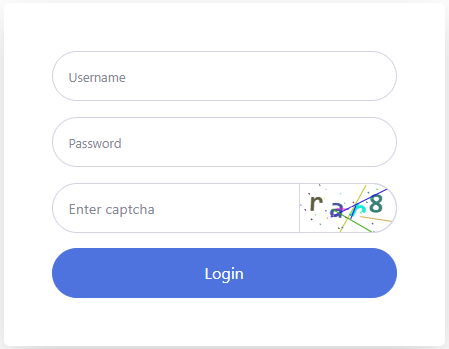
When the login page appears, enter:
- Username: admin
- Password: stdONU101
Click Login to access the management interface.
FAQs About VSOL ONU Login
1. Why can’t I access 192.168.1.1?
There are several possible reasons:
The ONU is not properly connected
Verify that:
- The Ethernet cable is securely connected.
- The Power LED is on.
- The PON/LOS indicators show normal operating status.
Your Computer Has No Valid IP Address
Try disconnecting and reconnecting the network cable or renewing your IP address.
The management IP has been changed
If another administrator has modified the LAN IP address, the default address will no longer work. Try checking your computer’s default gateway or contact your network administrator.
Browser cache issues
Clear your browser cache or try using another browser or private/incognito mode.
2. What if the username or password doesn’t work?
If the default credentials fail:
- Make sure there are no typing errors.
- Check whether the administrator password has already been changed.
- Ask your ISP or network administrator if the ONU was pre-configured before deployment.
If you cannot recover the credentials, you may need to perform a factory reset (if permitted by your ISP), which restores the default login information.
3. What can I configure after logging in?
- Wi-Fi SSID (wireless network name)
- Wi-Fi password
- 2.4GHz wireless settings
- 5GHz wireless srttings (on dual-band models)
- Wireless channel and channel bandwidth
- Transmit power
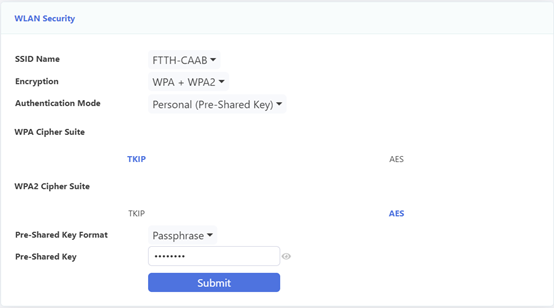
- WLAN security settings
- Other network management options supported by your ONU model.
After successfully accessing the web management interface, you can configure various device settings, including:
4. How do I change my Wi-Fi name and password?
After logging in:
- Navigate to the WLAN settings.
- Select either the 2.4GHz or 5GHz wireless network.
- Change the SSID (Wi-Fi name).
- Modify the wireless security password (Pre-Shared Key).
- Click Submit to save your changes.
5. Is the login process the same for every VSOL ONU?
The login procedure is generally the same across most VSOL ONU models. However, some ISP-customized firmware versions may use different default IP addresses, usernames, passwords, or interface layouts.
6. Will resetting the ONU erase my settings?
Yes. A factory reset restores the ONU to its default configuration, including the default IP address and administrator credentials. Any customized Wi-Fi settings or network configurations will be removed.
Need More Help?
If you’re still unable to log in to your VSOL ONU, check whether the device has been customized by your ISP or contact your local network administrator for assistance. For enterprise deployments or advanced configuration guidance, you can also reach out to the VSOL technical support team.


